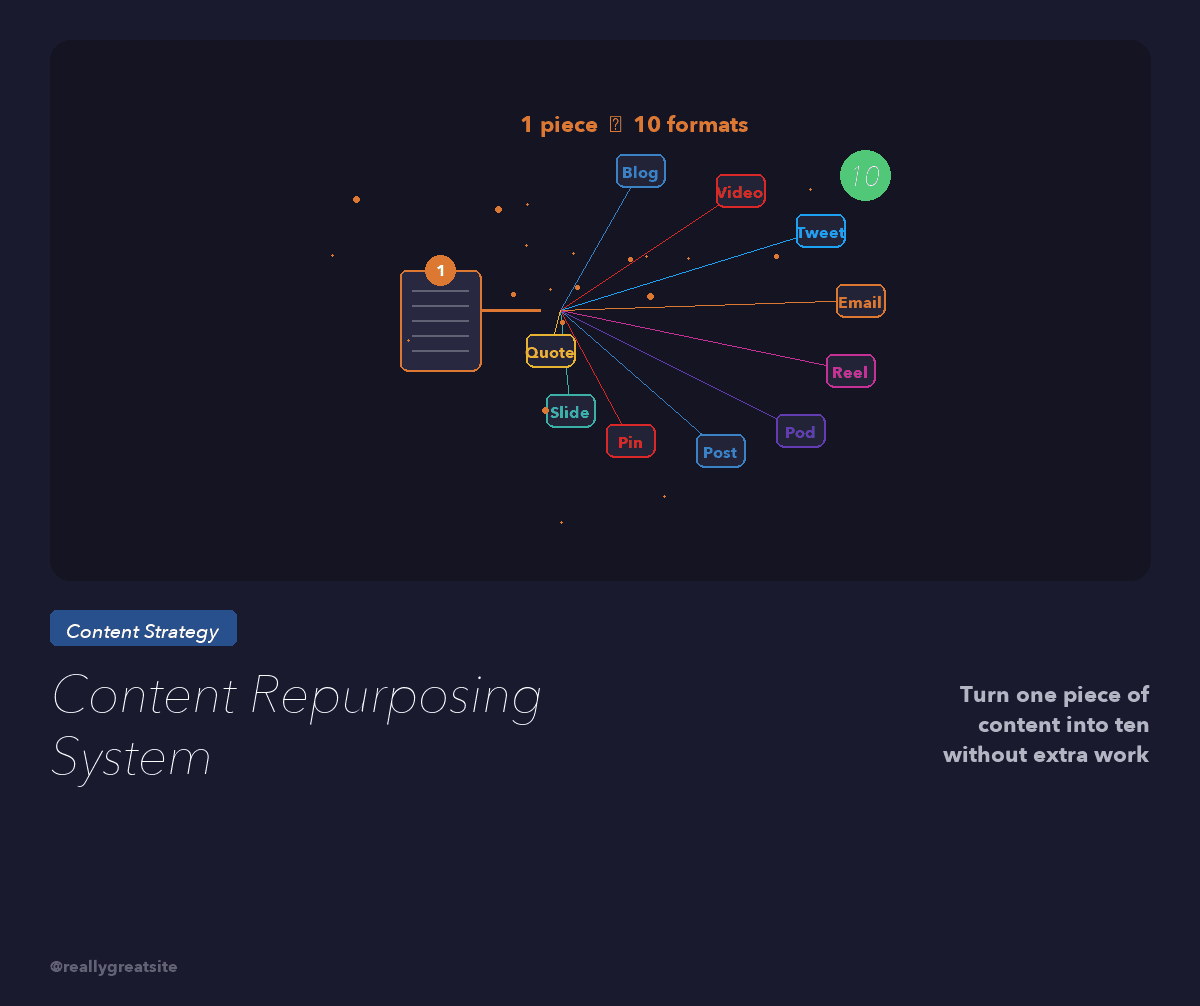
Stop creating from scratch every day. Here is the exact system that turns one long-form video into 30 pieces of content across every platform — with AI doing 80 percent of the heavy lifting.
A content repurposing system is the difference between entrepreneurs who dominate every platform and those who burn out posting once a week. I have helped hundreds of business owners build content machines, and the pattern is always the same: the ones who win are not creating more — they are extracting more from what they already create. One long-form video, properly repurposed, becomes 30 or more pieces of content across every channel. According to HubSpot's 2025 Content Marketing Report, marketers who repurpose content see 60 percent more output while spending 40 percent less time on creation. Those numbers are conservative based on what I see with clients who use AI in the workflow.
This is not theory. This is the exact content repurposing system I use, my clients use, and I teach inside Crazy Simple YouTube. One video. One hour of recording. 30+ assets. Here is the complete workflow.
Key Takeaways
- One 12-20 minute long-form video produces 30+ content assets across 6 platforms
- AI tools handle 80 percent of the repurposing — you invest time in one great video, machines handle the rest
- The system runs on a 5-day cycle: record Monday, repurpose Tuesday-Wednesday, schedule Thursday, publish Friday
- Content repurposing is not copy-pasting — each platform gets native-format content optimized for its algorithm
- This system replaces the need for a 5-person content team with 1 person and AI
Want me to build this exact repurposing system for your business? Let's map it out.
Book a Strategy SessionWhy Repurposing Beats Creating From Scratch
Most entrepreneurs approach content backwards. They wake up Monday and ask, "What should I post on Instagram today?" Then they spend 45 minutes crafting something from scratch. They repeat this across LinkedIn, email, YouTube, Twitter, and TikTok. By Friday they have spent 15 hours on content and published maybe 8 mediocre pieces.
The repurposing approach flips this entirely. You spend two to three hours creating one exceptional long-form video. Then you systematically break that video into platform-native content for every channel. Same core ideas. Different formats. Different hooks. Different lengths.
Here is why this works better:
- Message consistency. Every piece of content reinforces the same core idea. Your audience hears the same message 10 times across 5 platforms. That is how authority is built — not by saying 10 different things once.
- Quality over quantity. All your creative energy goes into one great video. Everything else is extraction, not creation. The quality of 30 repurposed pieces from one great video is dramatically higher than 30 pieces created independently.
- Algorithm leverage. Each platform rewards consistent publishing. When you post daily on Instagram, three times a week on LinkedIn, and twice weekly on YouTube, every algorithm starts working for you simultaneously.
A Content Marketing Institute study found that top-performing B2B marketers repurpose 67 percent of their content, compared to just 16 percent for low performers. The gap is not talent. It is systems.

The Core Video: Your Content Anchor
Everything starts with one long-form YouTube video. This is your cornerstone content — 12 to 20 minutes, deeply educational, solving a specific problem your audience has. This video needs to be structured for repurposing, which means building it with extraction points in mind.
Here is the structure I use for every core video:
- The Hook (0:00-0:30): A bold, specific claim or question that creates curiosity. This becomes your primary Short and social clip.
- The Framework Overview (0:30-2:00): Introduce the 3 to 5 main points. This becomes your carousel and email intro.
- Deep Dive Sections (2:00-15:00): 3 to 5 distinct teaching segments, each 2 to 4 minutes. Each one becomes its own Short, blog section, social post, and email segment.
- The Story/Case Study (15:00-18:00): A specific example proving the framework works. This becomes a standalone story post and testimonial clip.
- The CTA (18:00-20:00): Clear next step. This becomes the closing for every repurposed piece.
Notice how every segment has a dual purpose: it works as part of the full video AND as standalone content. That is intentional. I break down the full YouTube strategy behind this in our YouTube services — the repurposing system is just one layer of the content engine.
The 30-Piece Breakdown: What You Get From One Video
Here is the exact output from one 15-minute YouTube video. I am going to be specific because vague advice is useless.
YouTube (4 pieces):
- 1 long-form video (the original)
- 3 YouTube Shorts (hook clip, best teaching moment, story/result clip)
Blog (2 pieces):
- 1 full blog post (2,000+ words, transcribed and restructured for SEO)
- 1 shorter derivative post targeting a related long-tail keyword
Social Media (12 pieces):
- 3 Instagram Reels (same clips as Shorts, reformatted 9:16)
- 3 LinkedIn text posts (one per teaching point, written in first-person narrative)
- 3 Twitter/X threads (framework breakdown, hot take, actionable tips)
- 3 Instagram carousel slides (key frameworks visualized)
Email (3 pieces):
- 1 newsletter featuring the core framework with a link to the full video
- 1 nurture email expanding on one specific point for leads
- 1 case study email using the story segment
Podcast (2 pieces):
- 1 full podcast episode (audio extracted from the video, intro/outro added)
- 1 audiogram clip for social promotion
Community (7 pieces):
- 1 Skool community post with discussion prompt
- 3 comment responses using specific insights from the video
- 1 community poll based on the topic
- 2 quote graphics pulled from the strongest lines
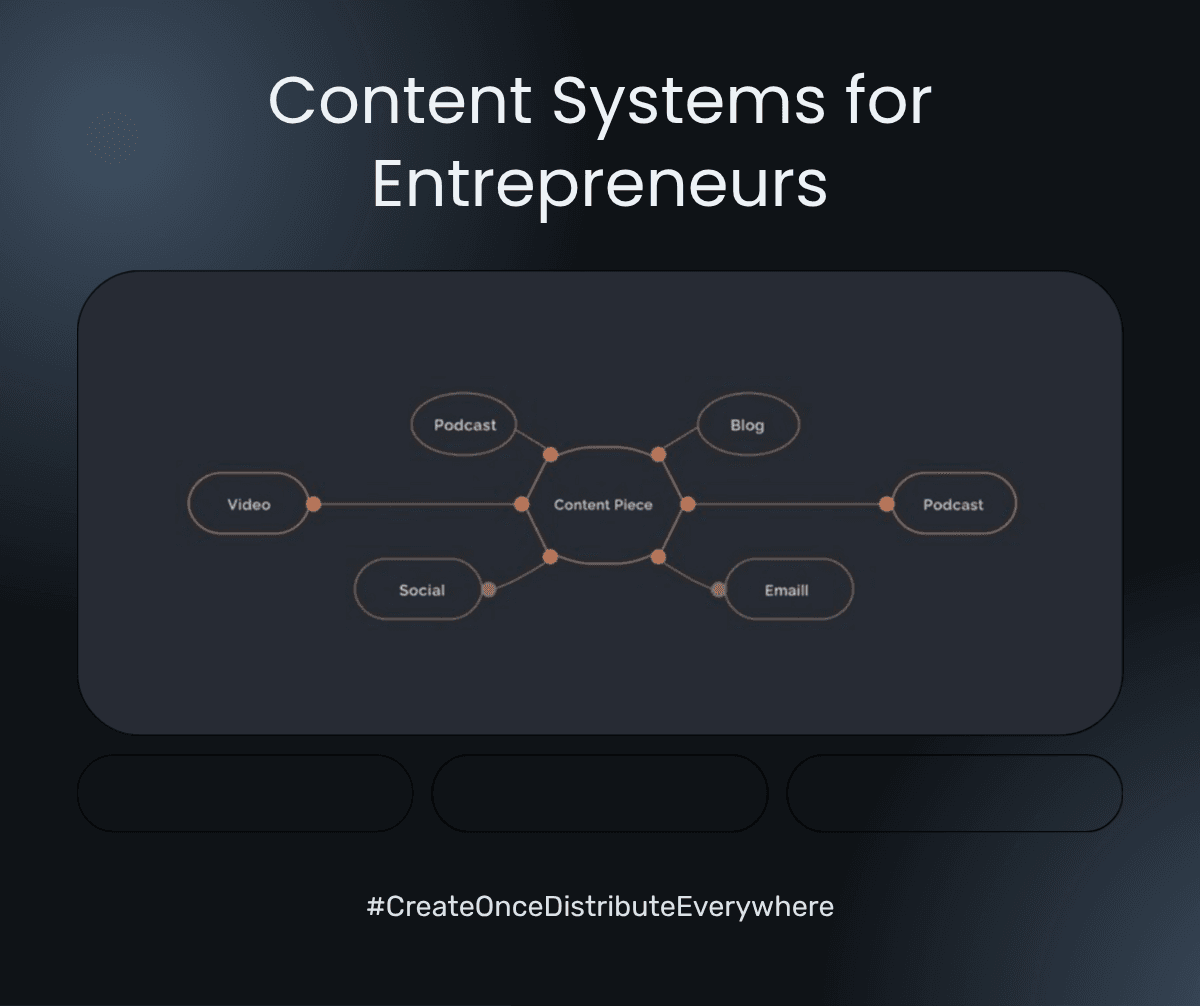
That is 30 pieces from one recording session. Not 30 copies of the same thing — 30 platform-native assets, each formatted for the algorithm and audience behavior of its channel.
The AI-Powered Repurposing Workflow
Here is where the system becomes absurdly efficient. AI handles 80 percent of the repurposing process. What used to require a 5-person content team now takes one person with the right AI systems in place.
The exact workflow, step by step:
- Record the core video (Monday, 1-2 hours including setup). Use a teleprompter app with your outline. Film once, no extensive editing needed for the repurposing assets.
- Auto-transcribe. Upload to a transcription tool. You now have a 3,000-5,000 word transcript in under 5 minutes. This is your raw material for everything written.
- AI blog generation. Feed the transcript into Claude with a prompt template that restructures it into a 2,000-word SEO-optimized blog post. Review and edit in 15 minutes. Total time: 20 minutes.
- AI social post generation. Feed the same transcript into Claude with separate prompt templates for LinkedIn posts, Twitter threads, and Instagram captions. Each template produces platform-native copy. Total time: 15 minutes to generate, 15 minutes to review.
- Auto-clip Shorts and Reels. Run the video through OpusClip or similar AI clipping tool. It identifies the highest-engagement moments and cuts them into vertical clips with captions. Total time: 10 minutes to review and select the best 3.
- Email extraction. Feed the transcript into Claude with your email template. It pulls the core framework, writes the newsletter, and drafts the nurture sequence. Total time: 10 minutes.
- Carousel creation. Use Canva with your brand templates. AI generates the text for each slide from the framework overview. Total time: 15 minutes.
- Schedule everything. Load all assets into your scheduling tool (Buffer, Later, or your platform of choice). Schedule across the week. Total time: 20 minutes.
Total repurposing time after recording: approximately 2 hours. Compare that to creating 30 pieces from scratch, which would take 20 to 30 hours minimum. That is a 90 percent time reduction. The AI systems I build for clients inside AI automation services cut this even further with custom workflows and templates.
Want me to set up your AI-powered repurposing system? I will build the templates, workflows, and automations for you.
Book a Strategy SessionThe 5-Day Content Cycle
The system runs on a weekly rhythm. No guessing. No scrambling. No "I should probably post something today" panic. Here is the exact schedule:
- Monday: Record the core video. 1-2 hours. This is your only creative session for the entire week.
- Tuesday: AI repurposing day. Run the transcript through all your prompt templates. Generate blog post, social posts, email content, carousel text. Review and edit. 2 hours total.
- Wednesday: Visual assets day. Create carousels, select Short clips, design quote graphics, record audiogram. 1 hour total.
- Thursday: Schedule everything across all platforms for the following week. 30 minutes.
- Friday: Engagement day. Respond to comments, DMs, and community discussions using insights from your content. 30 minutes.
Total weekly time investment: 5 to 6 hours. That produces 30+ pieces of content across 6 platforms. Compare that to the 15 to 20 hours most entrepreneurs spend creating less content with worse results. According to Sprout Social, brands that post consistently across multiple platforms see 3.5x more engagement than single-platform publishers. This system makes multi-platform presence effortless.
Platform-Native Optimization: Not Copy-Paste
The biggest mistake people make with repurposing is treating it like copy-paste. It is not. Every platform has different audience behavior, algorithm preferences, and content formats. What works on LinkedIn will flop on Instagram. What crushes on YouTube Shorts will not land on Twitter.
Here is how I optimize for each platform:
YouTube Long-Form: Educational, structured, keyword-optimized title and description. The full teaching experience. This is where you build deep trust.
YouTube Shorts: 30 to 60 seconds, single insight, text overlay, pattern interrupt in the first second. The algorithm prioritizes completion rate, so get to the point fast. I break down the full Shorts strategy in Crazy Simple YouTube.
LinkedIn: First-person narrative. Start with a bold claim or contrarian take. Use line breaks aggressively. End with a question to drive comments. LinkedIn rewards dwell time — longer posts with strong hooks outperform short ones.
Instagram: Visual-first. Carousels get 3x more engagement than single images. Reels need a hook in the first 0.5 seconds. Captions should be conversational and end with a CTA to save or share.
Twitter/X: Threads for frameworks. Single tweets for hot takes. Quote tweets for social proof. Keep it punchy. No paragraphs. Every line should stand alone.
Email: Personal tone. One core idea per email. Clear CTA. Subject lines pulled from the strongest hook in your video. Open rates jump 25 to 40 percent when subject lines are curiosity-driven rather than descriptive.
Podcast: Conversational flow matters more than production quality. Add a brief intro contextualizing the episode, keep the core teaching intact, and add a closing CTA. Listeners want depth, not polish.
Scaling the System: From Solo to Team
This system works whether you are a solopreneur or running a 20-person content team. The difference is who executes each step.
Solo (you + AI): You record the video and handle final review. AI does the transcription, writing, clipping, and scheduling. Total time: 5-6 hours per week for 30+ pieces.
You + 1 VA: You record and review. The VA handles all AI tools, scheduling, community posting, and engagement. Total time for you: 2-3 hours per week. The VA handles the rest in 8-10 hours.
Full content team: You record. A content manager runs the AI workflow and reviews output. A designer handles visual assets. A community manager handles engagement. Total time for you: 1-2 hours per week for the recording only. The team produces 60+ pieces from 2 videos.
The beauty of this system is that it scales without changing the core process. You add people to increase output, not to reinvent the workflow. Every step is documented, templated, and repeatable. That is the difference between a content strategy and a content system.
I help clients build this exact infrastructure inside AI automation services — from solo operators producing 30 pieces a week to teams producing 100+ without burning out.
Ready to turn one video into 30 pieces of content? Let me map out your repurposing system in a free strategy session.
Book a Strategy SessionFrequently Asked Questions
Will repurposed content hurt me with duplicate content penalties?
No. Google does not penalize content that appears in different formats across different platforms. A blog post, a LinkedIn post, and a tweet covering the same topic are not duplicate content — they are different formats serving different audiences. The key is that each piece is adapted for its platform, not copy-pasted verbatim.
How long should my core video be for maximum repurposing?
12 to 20 minutes is the sweet spot. Shorter than 10 minutes and you do not have enough distinct segments to extract 30 pieces. Longer than 25 minutes and the quality often drops in the back half. Aim for 3 to 5 clear teaching segments of 2 to 4 minutes each.
What AI tools do you recommend for content repurposing?
Claude for all written content (blog posts, social copy, emails, newsletters). OpusClip for auto-clipping Shorts and Reels from long-form video. Canva AI for carousel and graphic generation. Descript for transcription and podcast editing. Buffer or Later for multi-platform scheduling.
Can I repurpose old videos or does this only work with new content?
You can absolutely repurpose your existing library. In fact, I recommend starting there. Go through your last 20 videos and repurpose the top 5 performers. You already know that content resonates — now extract maximum value from it before creating anything new.
How do I maintain authenticity when AI generates most of the written content?
The AI is writing from your transcript — your words, your frameworks, your stories. It is restructuring your ideas for different formats, not creating new ideas. Always review and edit AI output to add your personal touches, remove anything that does not sound like you, and add specific details only you would know.
What if I do not have a YouTube channel yet?
Start with any long-form content format — a podcast episode, a live workshop recording, even a detailed voice memo. The repurposing system works from any long-form source. But I strongly recommend YouTube as your anchor because video gives you the most repurposing options. Read my guide on how to start a YouTube channel for business to get set up.
How often should I repurpose versus create net-new content?
80 percent repurposed, 20 percent net-new. Your one weekly core video is the net-new creation. Everything else is extraction and adaptation. If you are spending more time creating than repurposing, your system is broken.
What results can I expect from this system?
Clients who implement this system typically see a 3 to 5x increase in total content output, a 40 to 60 percent reduction in content creation time, and measurable growth in followers and leads within 60 to 90 days. The compound effect of consistent multi-platform presence is significant — most people underestimate how powerful omnipresence is for building authority.

Written by
Aaron CuhaAuthor of Crazy Simple YouTube, keynote speaker, and executive coach with 20,000+ hours logged. ICF PCC, NLP Master Practitioner, and DISC Certified. Aaron helps entrepreneurs replace hustle with AI-powered systems that generate leads, content, and revenue on autopilot.